Hey folks, let’s talk about something that most people don’t think about until there’s a problem with their electrical setup—surge protective devices (SPDs), specifically the T2 120KA ones. I’m a supplier of these, and over the years, I’ve had so many customers ask me, “Wait, does my SPD actually work? How do I know?” That’s where the self-diagnostic function comes in—it’s not just a fancy add-on; it’s the thing that stops your SPD from becoming a paperweight after it’s done its job catching a big surge. Let me break this down like I would to a customer who’s standing in my warehouse, holding one of these units, no jargon, no fluff. T2 120KA Surge Protective Device
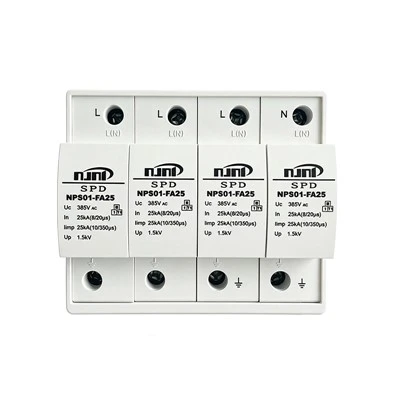
First, let’s get the basics straight: T2 SPDs are the workhorses for building electrical systems—think commercial offices, warehouses, even large residential complexes. They’re designed to handle medium-to-high surges, like those from lightning strikes or grid switching, which is why the 120KA rating matters (that’s the maximum surge current they can absorb in a single hit, for those who don’t know the KA stands for kiloamps). Now, every time an SPD takes a surge, it wears down a little. If you don’t track that wear, the next big surge could just pass right through it and fry your servers, HVAC, whatever’s connected downstream. That’s where self-diagnostics come in—this isn’t some new tech for tech geeks; it’s built into the core of how these units operate, literally.
Let’s start with the main component that makes all this happen: the varistor. Most T2 SPDs use metal oxide varistors (MOVs) because they’re super good at clamping surges. An MOV is basically a ceramic disc with metal on both sides, and its resistance changes based on the voltage running through it. When normal voltage is flowing (120V or 240V, whatever your system is), the MOV has really high resistance—so electricity just passes through it like it’s not even there. When a surge hits, the voltage spikes, and the MOV’s resistance drops instantly, diverting that extra current to the ground instead of your gear. But here’s the catch: every time the MOV does that, it’s breaking down a tiny bit of its material. After a certain number of surges, or if it gets hit with a really big one, the MOV can’t bounce back—its resistance stays low, which means it’s not protecting you anymore. That’s a failed SPD, and you need to know about that before it fails at the worst time.
So how does the self-diagnostic function track that MOV wear without needing someone to manually test it every month? It’s all about two simple parts: a status indicator and a tiny monitoring circuit built right into the SPD. Wait, no, it’s even simpler than that—most of the time, it’s a mechanical indicator that’s tied directly to the MOV’s condition, plus a visual light for extra clarity. Let me explain that first, because that’s the part that’s visible on the outside of the unit. If you’ve ever looked at an SPD, you’ve probably seen a little window on the front—usually green, yellow, or red. That’s the self-diagnostic’s “report card.” Here’s how it works: when the MOV is brand new and good to go, the window is green. That means the MOV has enough resistance to clamp surges, and it’s still functional. Now, when the MOV absorbs enough current to get close to its end of life, the internal mechanical trigger (it’s a small metal pin inside the unit) moves because the MOV has warped a tiny bit from all that surge energy. That pin pushes a little flag through the window, and suddenly it’s yellow or red—depending on the model, but usually yellow means “needs inspection soon” and red means “replace immediately.” That’s the basic, no-power-required self-diagnostic that’s standard on every T2 120KA SPD we sell.
But a lot of our commercial customers want more than just a window—they want to know if their SPD is failing even if they’re not walking by the unit every day, like in a basement or a utility closet. That’s where the advanced self-diagnostic comes in, and it’s still super straightforward, I promise. It uses a low-power monitoring circuit that’s wired into the SPD’s ground path. This circuit doesn’t interfere with the surge protection when it’s doing its job—it only kicks in when there’s normal or slightly abnormal voltage. What it does is measure the leakage current of the MOV. Wait, leakage current—when the MOV is good, it has almost zero leakage, right? Because its resistance is so high. As the MOV wears out, tiny amounts of current start leaking through it when it’s not clamping a surge. The monitoring circuit tracks that leakage. If the leakage gets above a set threshold (our units are calibrated to trigger at 0.5mA, which is way below the level that would affect your system), it sends a signal to either an LED on the unit (so you can see it when you check) or to a building’s management system (BMS) via a dry contact or Modbus signal. That’s perfect for offices or data centers where someone’s monitoring the electrical system 24/7—they get an alert the second the SPD is on its last legs, not when it’s already failed.
I get it, some of you are thinking, “Wait, why not just test the SPD with a multimeter?” Yeah, you can do that, but that’s a manual job, and if you have 50 SPDs on a site, that’s hours of work. The self-diagnostic does this automatically, non-stop, without you having to touch anything. Let me give you a real example—last year, we had a customer in Atlanta who runs a big grocery chain. They installed 22 T2 120KA SPDs across their 15 stores, all with the advanced self-diagnostics. One of their stores had a little lightning strike that wasn’t even noticeable—just a flicker of the lights, no damage that anyone saw. But the SPD at that store had absorbed a bunch of surge energy, so its leakage current started creeping up. The BMS alerted the store manager at 2 a.m., when no one was there. The next day, our tech went out, replaced that SPD, and later that month, there was a way bigger surge at that same store from a grid switching event. If that old SPD had been in there, it would have failed, and their refrigeration units would have died, costing them thousands in lost food. That’s the value of this— it’s not just a feature; it’s a money-saver.
Let me clear up a common misconception here: self-diagnostic isn’t about testing if the SPD works during a surge. It’s about testing if the SPD is still capable of working during the next surge. Because when a surge hits, the MOV has to be at full strength to divert it. If it’s already worn, it might not clamp the voltage all the way through, so your gear still gets hit with a spike. The self-diagnostic catches that before that happens. Another thing: these units are tested to IEC 61643-1 standards, which is the global standard for SPDs. The self-diagnostic function is part of that testing—we don’t just slap a window on a unit and call it done. Every single T2 120KA SPD we ship goes through a 24-hour pre-ship check, where we verify that the status window is correct, the leakage monitoring is calibrated, and the dry contact signal works if the customer ordered that option.
Wait, let’s talk about what doesn’t count as self-diagnostic. Some cheap knockoff SPDs have a fake window—they’re just a sticker that turns from green to red after a set amount of time, regardless of whether the unit actually took any surges. That’s garbage. Our self-diagnostic is tied directly to the MOV’s actual condition, not a timer. That’s a big difference. Another knockoff trick is using a tiny MOV that can’t handle 120KA, so it fails super fast, and their “self-diagnostic” just covers that up. No, our 120KA rating is real—we test every batch to make sure it can handle that surge current in a single pulse, and the self-diagnostic is built around that actual capacity, not marketing numbers.
Let’s walk through a full lifecycle of an SPD with self-diagnostics to make it concrete. New unit: window is green, leakage is near zero, BMS shows “normal.” First surge—say a small one from a thunderstorm—MOV takes it, absorbs the energy, window stays green, leakage barely changes. Tenth surge—bigger one, MOV starts to show wear, window turns yellow, BMS sends a “needs inspection” alert. 20th surge—really big one, like a direct nearby strike, MOV is at the end of its life, window turns red, BMS sends an urgent alert, the mechanical trigger clicks so the window can’t be reset (you can’t just stick it back to green—you have to replace it). That’s it, step by step, no guesswork, no missed alerts.
Now, I know some of you are asking, “What about resetting the indicator?” Wait, some people think you can just push the window back to green, but no—you shouldn’t do that. The window is a one-way indicator that shows the MOV has reached its end of life. If you reset it, you’re ignoring a critical warning that your SPD is no longer protected. Our recommendation is: if the window is yellow, inspect the unit, check for physical damage (like dented casing, burned wires), and if everything looks okay, keep an eye on it for a month. If it turns red, replace it immediately, no exceptions. That’s the rule we give all our customers, and we’ve never had a complaint about an SPD failing early because of ignoring that red window.
For our residential customers who might be reading this—yes, we also sell smaller T2 120KA units for home electrical panels, and they have the same self-diagnostic window. If you see that window turn red on your home’s SPD, don’t just ignore it. That could mean a nearby lightning strike wore it out, and your AC or your smart TV is at risk. It’s a $50 part to replace, way cheaper than a $5,000 TV.
At the end of the day, the self-diagnostic function on T2 120KA SPDs isn’t a fancy add-on—it’s a safety net. It takes the guesswork out of surge protection, so you don’t have to climb into a dark utility closet every month to check a unit, and you don’t have to worry about your SPD failing when you need it most. We’ve worked with everything from small shops to large hospitals, and the ones that stick with our self-diagnostic SPDs are the ones that never have surge-related damage claims.
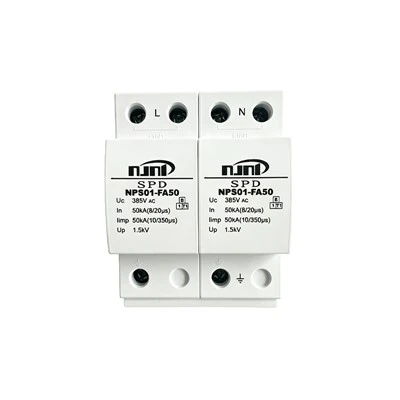
If you’re in the market for T2 120KA SPDs, whether it’s for a new build, a retrofitting project, or just replacing old units, hit us up to chat through your needs. We can help you pick the right model with the self-diagnostic features that fit your setup—basic visual windows for small sites, BMS-integrated advanced diagnostics for larger commercial or industrial spaces. We don’t do one-size-fits-all here, and we’ll make sure you get the protection that actually works, not just a unit that looks good on paper.
T2 40KA Surge Protective Device References:
IEC 61643-11: Low-voltage surge protective devices – Part 11: Surge protective devices connected to low-voltage power systems – Requirements and test methods
IEEE C62.41.2: Guide on surge voltages in low-voltage AC power circuits
Metal Oxide Varistor (MOV) Application Guide, Texas Instruments, 2022
Nanjing Ningpu Lightning Protection Equipment Manufacturing Co., Ltd.
Address: Building 1, No.20 Shengyuan Road, Lishui Economic Development Zone, Nanjing City, Jiangsu Province, China
E-mail: 3796023563@qq.com
WebSite: https://www.npspd.com/
